

Have you ever found yourself staring at a high-value item in your online shopping cart like a sleek new laptop, the latest smartphone, or a much-needed home appliance, only to hesitate at the final checkout screen?
Big-ticket purchases are exciting, but dropping a massive lump sum all at once can put an uncomfortable strain on your monthly budget.
That’s where SPayLater comes in. As Shopee’s built-in Buy Now Pay Later (BNPL) feature, SPayLater lets you split major purchases into manageable, affordable monthly installments. Instead of delaying your essential updates or draining your savings, you can enjoy your items immediately while keeping your finances intact.
In this complete guide, we will break down how SPayLater installment plans work, explore available installment options, walk through a step-by-step setup at checkout, explain interest calculations, and share best practices to keep your budget on track.
Why Use SPayLater for Big-Ticket Purchases?
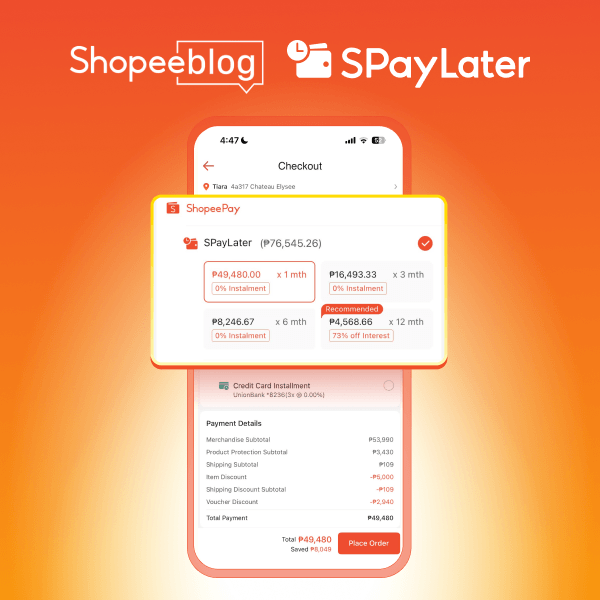
You don’t have to compromise your financial security when you shop for expensive items. Here is why using SPayLater for large purchases is a smart move for savvy online shoppers:
- Manage Cash Flow: Avoid sudden, massive cash outflows. By spreading out payments, you retain liquidity and keep extra funds available for daily living costs or emergency funds.
- Flexible Payment: Choose a repayment timeline tailored to your exact monthly cash flow, ranging from 1-month extensions to 12-month installment schedules.
- Exclusive 0% Interest Promotions: Take advantage of major Shopee promotional events like 11.11, 12.12, and Payday Sales, where eligible items or merchants may be covered by special 0% interest SPayLater offers at checkout.
- No Credit Card Required: Access structured, bank-grade installment plans without going through lengthy credit card applications or paying annual card fees.
Available SPayLater Installment Options & Installment Breakdown
Selecting the right installment plan depends on your purchase size and monthly repayment capacity. Here is a breakdown of the available installment plans:
Pro-Tip: In the Shopee app, check your available credit limit under the Me page > SPayLater before checking out to ensure your balance fully covers the total purchase value of your item.
Step-by-Step: How to Select SPayLater Installments at Checkout
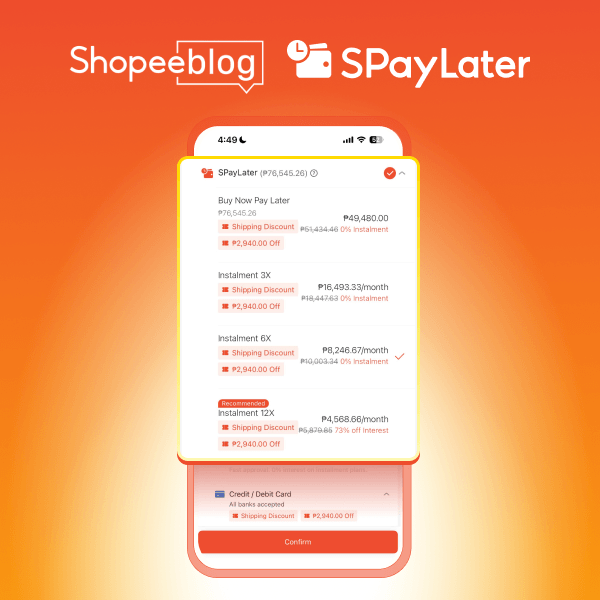
Splitting your total cost at checkout takes only a few taps. Here is how to complete your order using SPayLater:
- Add Big-Ticket Items to Cart & Proceed to Checkout: Search for your desired product (confirm that the seller supports SPayLater) and click Check Out.
- Choose ‘Payment Option’: Select SPayLater > On the main Checkout screen, tap on Payment Option, select SPayLater, and tap Confirm.
- Select Your Preferred Installment Plan: Review the real-time monthly payment breakdown for 3, 6, or 12 months (including applicable processing/interest fees) and pick the schedule that fits your monthly budget.
- Apply SPayLater Discounts or 0% Interest Offers: Tap Platform Voucher on the checkout page to apply available SPayLater discounts or cashback offers. For eligible items or merchants, special 0% interest offers are applied at checkout
- Confirm Order & Authenticate: Tap Place Order and verify the transaction using your ShopeePay PIN or biometric setup (Face ID/Fingerprint).
How Interest Rates & Processing Fees Are Calculated
SPayLater provides a completely transparent fee structure. Before you complete any purchase, Shopee explicitly details the exact monthly breakdown, so you never have to guess how much you owe.
Calculation Breakdown Example
Suppose you want to buy a new gadget worth ₱12,000 using a 6-month installment plan:
- Base Principal: ₱12,000 / 6 months = ₱2,000 / month
- Monthly Processing Fee/Interest: Applied as a small fixed percentage on the base total (displayed clearly on the selection screen).
- Total Monthly Due: Base Principal + Processing Fee + Interest (if applicable).
As long as you pay your monthly statement on or before the due date, there are zero hidden fees or unexpected surge charges added to your account.
Best Practices for Managing Large SPayLater Installments
To keep your credit standing healthy and maintain a high credit limit, practice these smart repayment strategies:
- Set Up Auto Repayment: Link your MariBank or ShopeePay account, or your preferred bank card to activate auto-debiting so you never miss a payment deadline.
- Track Monthly Statements: From the Me Page in your Shopee app, find SPayLater. Once there, find the “My Bill” button to check your pending payments.
- Pay Off Early When Possible: Settling your monthly bills ahead of schedule clears your current balance faster, instantly freeing up your credit limit for future purchases.
Frequently Asked Questions (FAQ)
Can I use SPayLater installments alongside Shopee discount vouchers?
A: Yes! You can combine shop-specific vouchers, free shipping vouchers, and SPayLater 0% interest or cashback offers within a single checkout session.
What happens if my SPayLater credit limit is lower than the item price?
A: SPayLater requires your available credit limit to cover the entire purchase value. If your limit is insufficient, you must select another payment option or request a credit limit increase through the app. Requesting for a credit limit increase is available for select users only.
Where can I view my SPayLater bill with monthly breakdown?
A: You can view it directly in either the MariBank or Shopee app by tapping SPayLater on the homepage. From there, go to My Bills and select the specific month to view your bill details.
Is there a penalty for paying off the remaining installment balance early?
A: No. There are no penalty charges or extra fees for settling your remaining SPayLater balance ahead of your scheduled due dates.
Are there fees for late SPayLater payments?
A: Yes. Each SPayLater transaction has an interest rate and processing fee. The standard interest rate is up to 3.95% per month on your total order, while a processing fee of 0–7% is applied once the order is complete. If you fail to pay on time, a late payment fee of 2.5–5% will be applied to the remaining amount on a monthly basis.
Ready to Upgrade? Activate SPayLater Today
Ready to upgrade your tech, revamp your home, or treat yourself without breaking the bank? Open your Shopee app, head to the Me tab, and tap SPayLater to activate your account in under two minutes. Check your credit limit, claim your exclusive 0% interest vouchers, and enjoy the freedom of flexible, stress-free installments on your next checkout!