

Choosing between the POCO Pad C1, M1, and X1 can be tricky, especially when all three seem like solid, budget-friendly options for everyday use. However, each model has its own differences in display, performance, battery life, storage, and price. In this guide, we’ll take a closer look at each POCO Pad and see what sets them apart to help you decide which one is worth considering.
What Is POCO?
POCO is an independent consumer technology brand that was established by Xiaomi Corporation in 2018. The brand is present in more than 35 global markets, including the Philippines.
POCO follows the philosophy “everything you need, nothing you don’t” focusing on technology and features that meet the needs of its users. This approach also extends to its tablet lineup, with the POCO Pad series offering different options across various needs and budgets.
We’ve compiled the specifications and features of the POCO Pad C1, M1, and X1, along with insights from online reviews, to help you compare the three models.
POCO Pad C1 Review
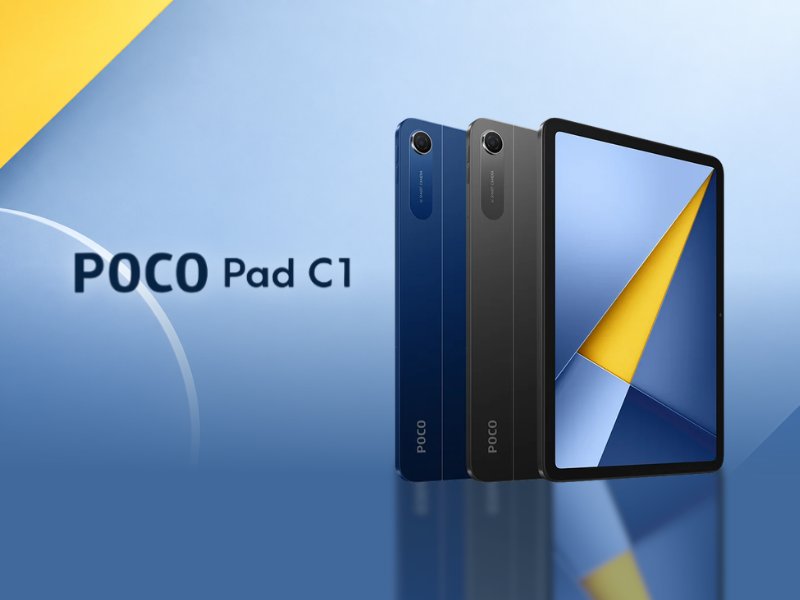
Launched in 2026, the POCO Pad C1 is the most compact and affordable model among the three. It combines a 9.7-inch 2K display with a 120Hz refresh rate and a 7600mAh battery. It utilizes the entry-level Snapdragon® 6s 4G Gen 2 chipset, making it suitable for light and basic everyday tasks.
Product Specifications
- Dimensions: 226.51mm x 147.97mm x 7.4mm
- Weight: 406g
- Display: 9.7” IPS LCD, 600 nits
- Resolution: 2K, 2048 x 1280
- Refresh Rate: Up to 120Hz
- Processor: Snapdragon® 6s 4G Gen 2
- RAM & Storage: 4GB + 64GB / 6GB + 128GB
- Storage Expansion: Up to 2TB
- Camera: Rear: 8MP / Front: 5MP
- Audio: Hi-Res Audio
- Battery: 7600mAh
- Fast Charging: 18W
- Reverse Charging: —
- Colors: Blue, Grey
- Price: ~₱10,499 to ₱12,499
Key Features and Performance
- Immersive Viewing Experience: The POCO Pad C1 has a 9.7-inch IPS LCD with a 2048 x 1280 resolution and 250 ppi. Its refresh rate reaches up to 120Hz for smoother scrolling and fast-moving content. It reaches up to 600 nits in outdoor mode and also carries TÜV Rheinland certifications for low blue light, flicker-free operation, and circadian-friendly display use.
- Long-Lasting Battery for Everyday Use: The 7600mAh battery is designed to support up to 1.7 days of use. POCO lists up to 15 hours of online video playback, 18 hours of audio playback, and 16 hours of online reading.
- Everyday Performance and Expandable Storage: The tablet uses the Snapdragon® 6s 4G Gen 2, an entry-level chipset designed for light everyday tasks. It also supports storage expansion of up to 2TB.
What Users Say
As the cheapest POCO Pad in this lineup, the C1 is positioned as a budget-friendly and lightweight tablet. Its smaller size also makes it easier to carry than larger pads.
For basic activities such as web browsing and using social media apps, reviewers found its performance adequate. Overall, the C1 focuses on portability, basic everyday use, and affordability rather than high-end performance.
Buy It Here:
- POCO PAD C1 9.7″ crystal-clear display
- POCO Pad C1 | 4+64GB/6+128GB | 9.7″ 2K 120Hz crystal-clear display, Massive 7600mAh (typ) battery, Snapdragon® 6s 4G Gen 2
POCO Pad M1 Review
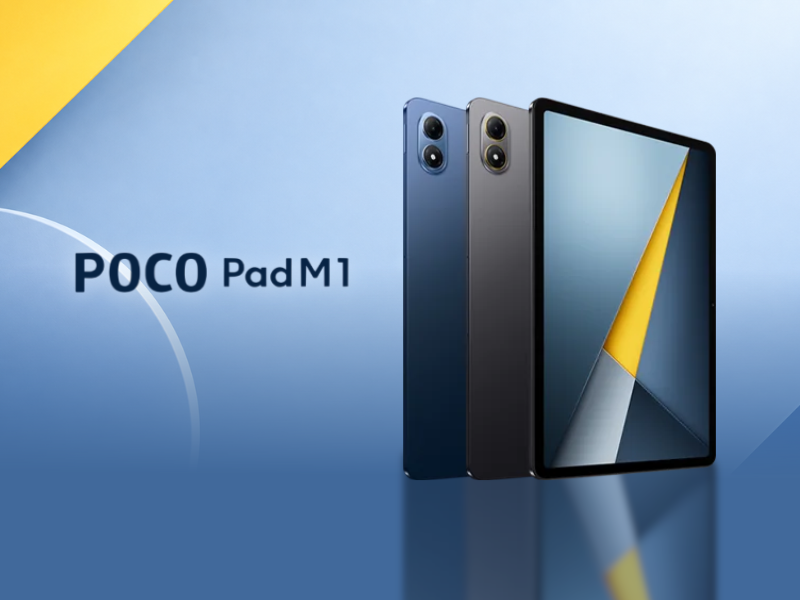
The POCO Pad M1 offers a larger setup, with a 12.1-inch display and a 12000mAh battery. It also comes with the higher-tier Snapdragon® 7s Gen 4 Mobile Platform compared with the entry-level chipset on the C1. Launched in November 2025, the M1 is suited for media streaming, studying, and productivity, thanks to its larger display and overall hardware setup.
Product Specifications
- Dimensions: 279.80mm x 181.65mm x 7.5mm
- Weight: 610g
- Display: 12.1-inch IPS LCD, 600 nits, supports Dolby Vision®
- Resolution: 2.5K, 2560 x 1600
- Refresh Rate: Up to 120Hz
- Processor: Snapdragon® 7s Gen 4
- RAM & Storage: 8GB + 256GB
- Storage Expansion: Up to 2TB
- Camera: Rear: 8MP / Front: 8MP
- Audio: Dolby Atmos® supported
- Battery: 12000mAh
- Fast Charging: 33W
- Reverse Charging: 27W
- Colors: Blue, Grey
- Price: ~₱20,999
Key Features and Performance
- Large, Smooth Display: The M1 features a 12.1-inch IPS LCD, the largest display in the lineup, with a 2560 x 1600 resolution and up to a 120Hz refresh rate. It supports 1.07 billion colors and Dolby Vision for a more detailed and vibrant viewing experience. Like the other POCO Pads, it also has TÜV Rheinland certifications for low blue light, flicker-free operation, and circadian-friendly use.
- Long Battery Life: The M1 has the largest battery among the three POCO Pads at 12000mAh. It supports up to 14.24 hours of continuous video streaming, 16.04 hours of reading, and 105.36 hours of continuous music playback based on POCO’s internal testing. POCO also lists up to 83.05 days of standby performance.
- Reverse Charging Support: The M1 supports 33W fast charging and 27W wired reverse charging, allowing it to provide power to compatible devices such as smartphones and earbuds.
- Performance and Storage: The M1 runs on the Snapdragon® 7s Gen 4 Mobile Platform, which supports everyday tasks, multitasking, and entertainment. It comes with 8GB of RAM and 256GB of internal storage, with expandable storage of up to 2TB.
- Immersive Audio: The M1 has quad speakers with Dolby Atmos support. POCO also says its speakers can reach up to 300% higher volume under certain speaker-mode conditions.
What Users Say
Reviews highlight the M1’s large display, battery life, expandable storage, and HyperOS features. Its styling and build quality also give it a more mid-range feel, with reviewers noting that it suits entertainment, studying, and productivity. The cameras are not its strongest feature in terms of image quality, but they are suitable for video calls, scanning simple documents, and taking basic snapshots.
Buy It Here:
- New POCO Pad M1 | 8+256GB, 12.1° 120Hz 2.5K display, Massive 12000mAh (typ) battery, Snapdragon® 7s Gen 4, Supports 27W
- POCO Pad M1 12000mAh Battery 12.1″ Snapdragon® 7s Gen 4
POCO Pad X1 Review
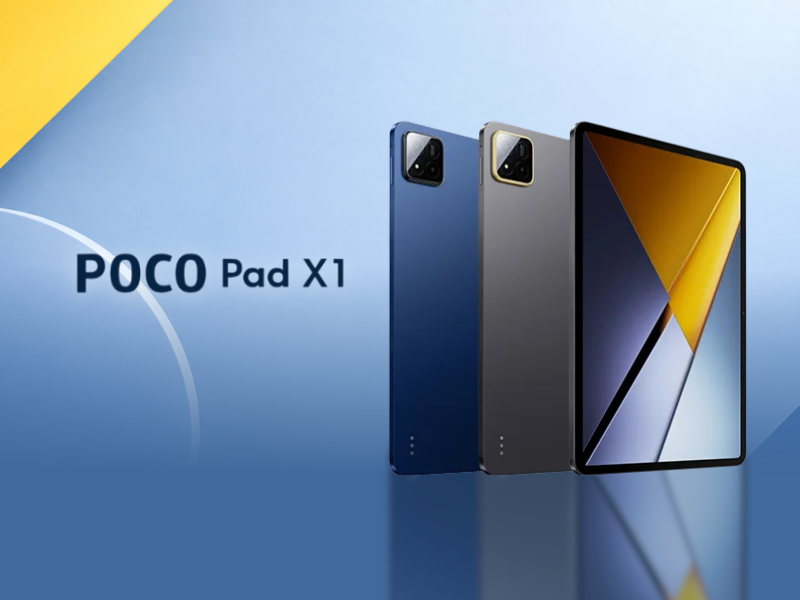
The POCO Pad X1 is the most expensive model among the three and offers the highest-end hardware setup. It combines an 11.2-inch 3.2K display with a 144Hz refresh rate, Snapdragon® 7+ Gen 3 processor, 8GB RAM, and 512GB storage.
Product Specifications
- Dimensions: 251.22mm x 173.42mm x 6.18mm
- Weight: 500g
- Display: 11.2-inch IPS LCD, 800 nits, supports Dolby Vision®
- Resolution: 3.2K, 3200 x 2136
- Refresh Rate: Up to 144Hz
- Processor: Snapdragon® 7+ Gen 3
- RAM & Storage: 8GB + 512GB
- Storage Expansion: —
- Camera: Rear: 13MP / Front: 8MP
- Audio: Dolby Atmos® supported
- Battery: 8850mAh
- Fast Charging: 45W
- Reverse Charging: —
- Colors: Blue, Grey
- Price: ~₱27,999
Key Features and Performance
- Sharp, Smooth Display: The X1 has the highest refresh rate (144Hz) and resolution (3200 x 2136) in the lineup. It also supports Dolby Vision, which can deliver more vibrant colors and greater detail in compatible content. The display reaches up to 800 nits brightness and has the same TÜV Rheinland certifications as the other POCO Pads.
- Performance for Gaming and Entertainment: Powered by the Snapdragon® 7+ Gen 3, which is designed to support demanding gaming, generative AI features, and fast connectivity. POCO positions the X1 for both entertainment and gaming.
- AI-Powered Features: Comes with Xiaomi HyperAI, offering AI-powered tools for tasks such as searching, generating text and images, and creating meeting minutes. It also supports Gemini features such as Gemini Live, Image Generation, and Gemini Extensions.
- Large Battery With Fast Charging: Has an 8850mAh battery and supports 45W turbo charging. POCO states that it can provide more than 10.9 hours of video streaming.
- Four-Speaker Audio: Has quad speakers with Dolby Atmos support and a stated 200% volume boost.
- Capable Camera Setup: The X1 has a 13MP rear camera and an 8MP front camera, suitable for everyday photos, video calls, and other basic camera needs.
What Users Say
Reviews highlight the X1’s sharp display, smooth performance, and immersive audio, making it suitable for work, entertainment, and gaming. Reviewers also found multitasking fluid, with apps running smoothly without noticeable stutters. Its battery life and quad-speaker setup were also praised for supporting longer media sessions and an enjoyable viewing experience.
Buy It Here:
POCO Pad C1 vs M1 vs X1: Overall Comparison
| Specification | POCO Pad C1 | POCO Pad M1 | POCO Pad X1 |
| Dimensions (mm) | 226.51 x 147.97 x 7.4 | 279.80 x 181.65 x 7.5 | 251.22 x 173.42 x 6.18 |
| Weight | 406g | 610g | 500g |
| Display | 9.7″ IPS LCD, 600 nits | 12.1″ IPS LCD, 600 nits, Dolby Vision® | 11.2″ IPS LC, 800 nits, Dolby Vision® |
| Resolution | 2048 x 1280 | 2560 x 1600 | 3200 x 2136 |
| Refresh Rate | 120Hz | 120Hz | 144Hz |
| Processor | Snapdragon® 6s 4G Gen 2 | Snapdragon® 7s Gen 4 | Snapdragon® 7+ Gen 3 |
| RAM & Storage | 4GB + 64GB / 6GB + 128GB | 8GB + 256GB | 8GB + 512GB |
| Storage Expansion | Up to 2TB | Up to 2TB | — |
| Camera | Rear: 8MP, Front: 5MP | Rear: 8MP, Front: 8MP | Rear: 13MP, Front: 8MP |
| Audio | Hi-Res Audio | Dolby Atmos® | Dolby Atmos® |
| Battery | 7600mAh | 12000mAh | 8850mAh |
| Fast Charging | 18W | 33W | 45W |
| Reverse Charging | — | 27W | — |
| Colors | Blue, Grey | Blue, Grey | Blue, Grey |
| Price | ~₱10,499 to ₱12,499 | ~₱20,999 | ~₱27,999 |
Which POCO Pad Should You Get?
The biggest differences between the POCO Pad C1, M1, and X1 come down to size, performance, display, battery, storage, and price.
The POCO Pad C1 is the smallest and lightest of the three. Its lower price, entry-level chipset, and storage of up to 128GB make it suited for basic everyday tasks like browsing and social media.
The POCO Pad M1 has a larger display and longer battery life, along with 27W reverse charging and expandable storage of up to 2TB. It’s better suited for media consumption, reading, studying, and everyday productivity.
The POCO Pad X1 offers a higher-end display and hardware setup. Its performance makes it better suited for gaming, multitasking, and more demanding entertainment and productivity tasks.
Ultimately, your choice depends on the features that matter most to you. Consider your preferred screen size, performance needs, storage requirements, and budget when choosing between the three.
Frequently Asked Questions (FAQs)
Which POCO Pad is best for everyday use?
The POCO Pad C1 is suited for basic everyday tasks like browsing and social media. The M1 is better for reading, studying, media consumption, and productivity, while the X1 is suited for gaming, multitasking, and more demanding tasks.
How long does the POCO Pad M1 battery last?
The POCO Pad M1 has a 12000mAh battery. POCO states that it can support up to 14.24 hours of video streaming, 16.04 hours of reading, and 105.36 hours of music playback based on its internal testing.
Can POCO Pad tablets be used for studying and productivity?
Yes. The M1 and X1 have larger displays and features suited to studying, productivity, and multitasking. Their larger screens also provide more room for tasks such as reading, note-taking, and working across multiple apps.
Which POCO Pad should I choose?
It depends on your priorities. The C1 is suited for basic everyday tasks, the M1 focuses on screen size, battery life, and productivity, while the X1 is better suited for gaming, multitasking, and more demanding tasks.
Ready to get your POCO Pad? Check Shopee Mall for authentic listings, the latest prices, vouchers, and exclusive deals. You can also join Shopee VIP to enjoy extra perks and benefits on your purchases.