

Payday is still a few days away, but your Meralco bill is due now. Sound familiar?
If you have SPayLater, you can settle your electricity bill right inside the Shopee App and repay it later -. No queues, no scrambling for cash, and no missed due dates on your Meralco account.
In this guide, we’ll walk you through paying your Meralco bill with SPayLater, how your repayment schedule works, and what to do if you ever miss a due date.
Can You Really Pay Meralco Bills with SPayLater?
Yes, you can. Meralco is one of the electricity billers available in the Shopee App, and SPayLater can be chosen as your payment method when you’re eligible. The amount is charged to your SPayLater balance, which you then repay on your monthly statement.
Before you start, make sure you have:
- An active SPayLater account. If yours is not yet activated, open your Shopee app and go to the Me tab and tap SPayLater under Financial Services.
- Enough available credit limit. Your limit needs to cover the full bill amount. You can check it under Me > SPayLater.
- Your Meralco account number and the amount you need to pay, which are both found on your Meralco bill.
This option comes in handy when your bill lands before payday, when you’d rather keep your cash for other expenses, or when you simply don’t want to leave the house to pay.
Step-by-Step: How to Pay your Meralco Bill
Paying your bill only takes a few taps. Here’s how:

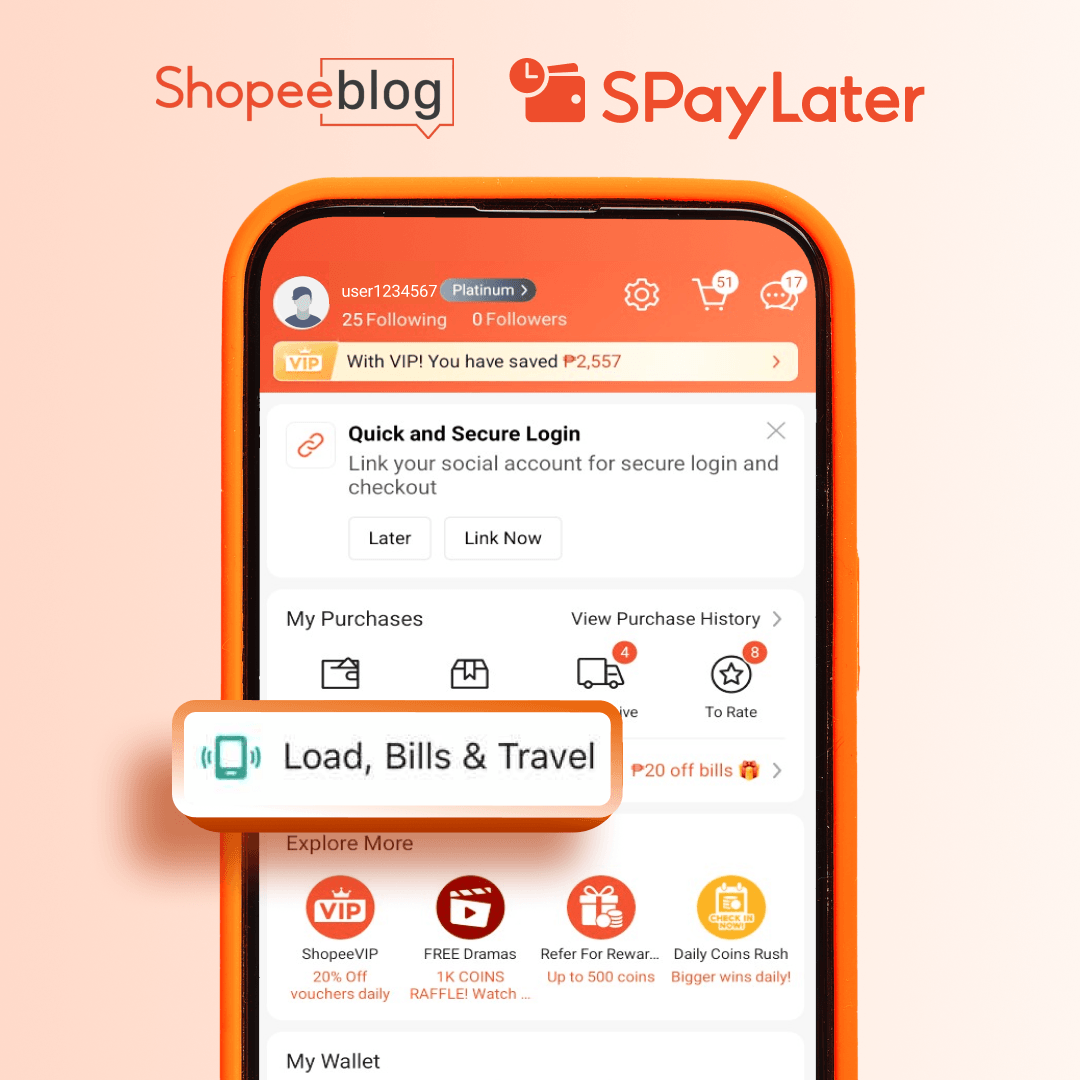
1. Open the Shopee App and go to Me. Tap the Load, Bills & Travel bar then choose Electricity.
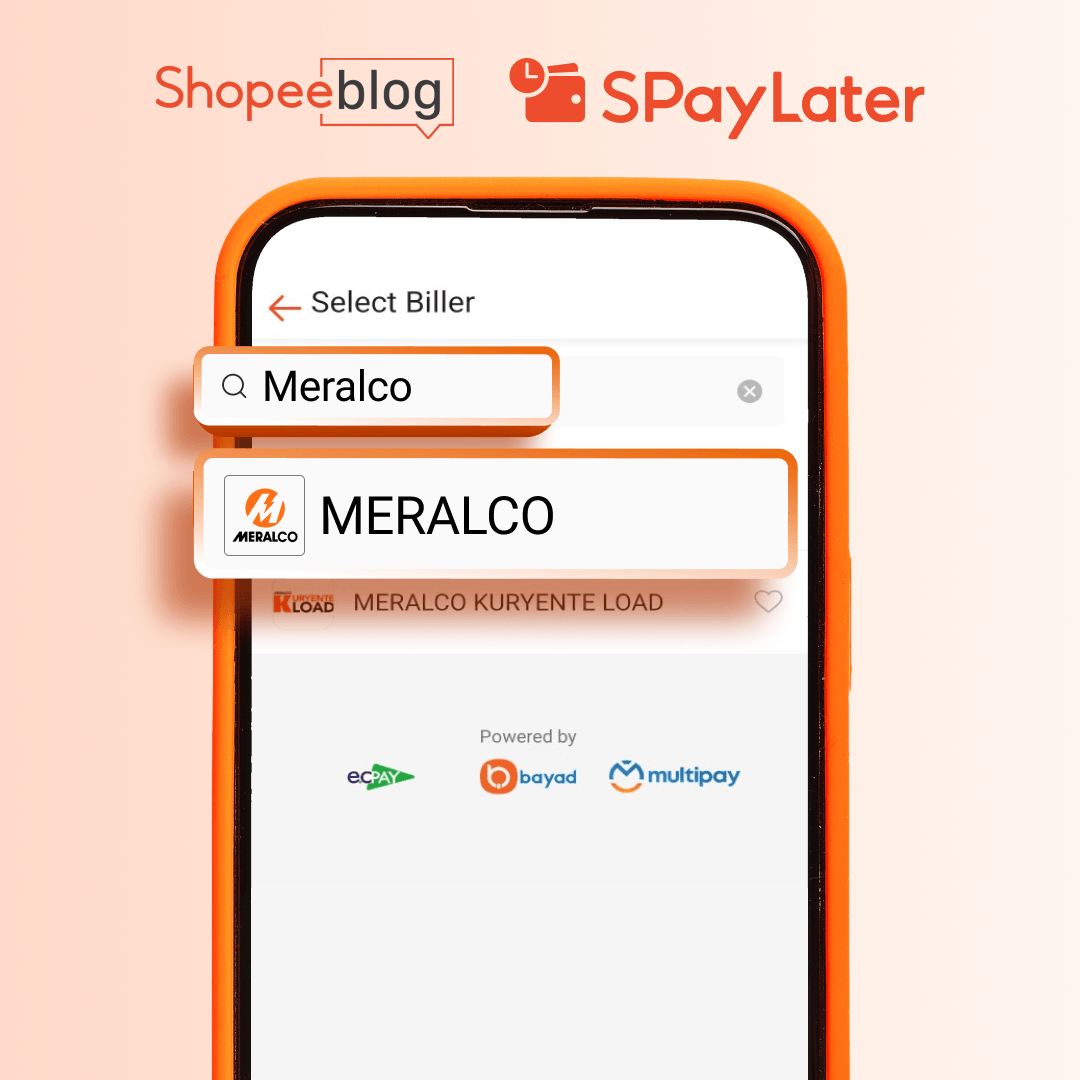
2. Select Meralco. Pick from the list of electricity billers.
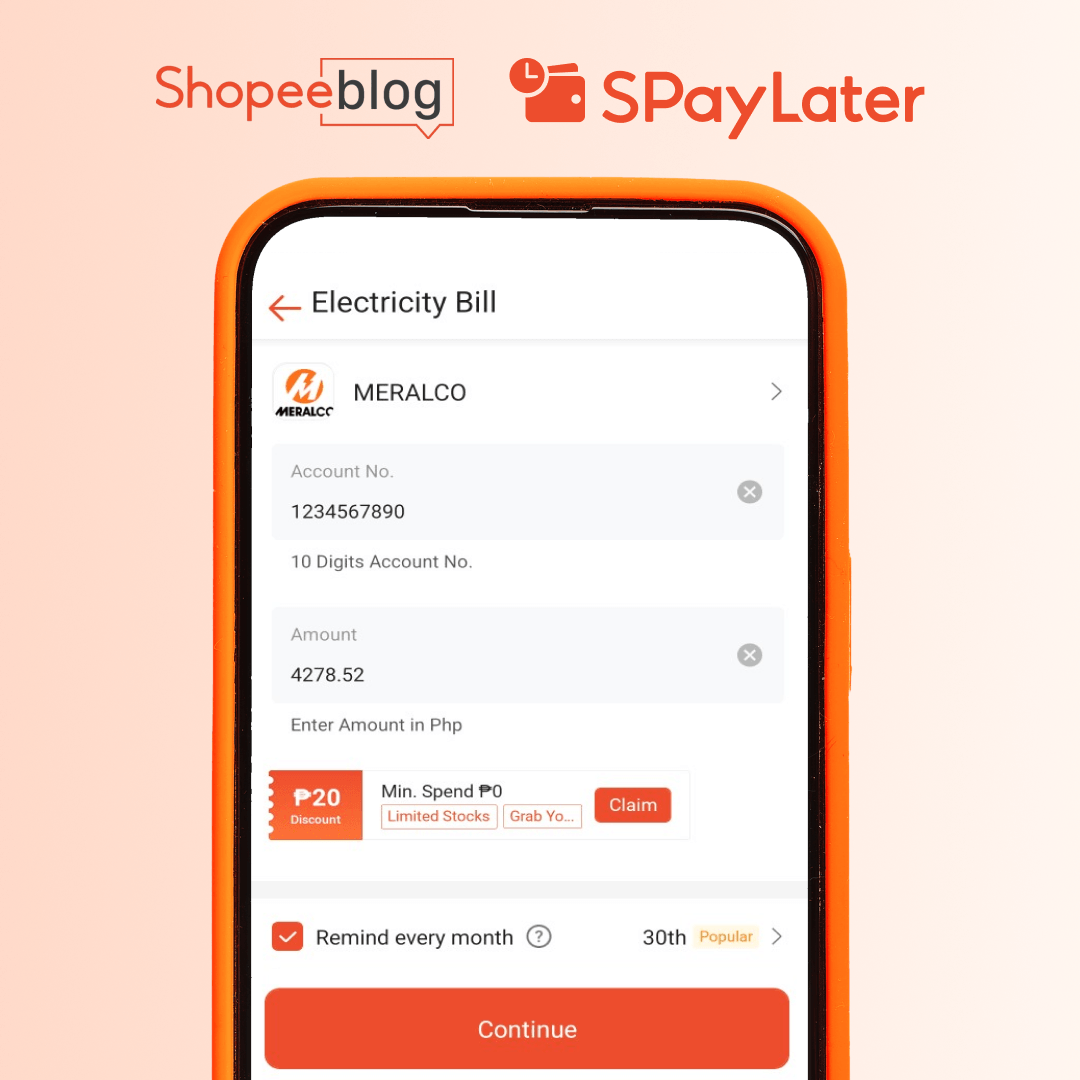
3. Enter your details. Type in your Meralco account number and the amount due. Make sure to double check that you got both right before proceeding.
4. Choose SPayLater as your payment option. On the payment screen, tap Payment Option, select SPayLater, and tap Confirm.
5. Review the breakdown. Any applicable processing fee or interest is shown before you pay, so you’ll know exactly what to expect on your statement.
6. Confirm your payment. Tap Pay and verify with your ShopeePay PIN or biometrics (Face ID or fingerprint).
Once your payment goes through, you’ll see a confirmation in the app. Screenshot it or save the reference number for your records. Meralco may take some time to reflect your payment, so it’s best to pay ahead of your due date rather than wait until the last minute.
Understanding Your SPayLater Payment Schedule for Bills
Your Meralco payment is added to your SPayLater bill, and you repay it on your statement’s due date, not on the day you paid Meralco. Here’s how it works:
- Find your bill. Go to Me > SPayLater > My Bill and select the month to see the full breakdown, including your Meralco payment.
- Check your due date. Each statement shows the amount due and the date you need to pay by.
- Repay your way. Pay through the SPayLater page in the Shopee app using any supported payment method, such as MariBank or ShopeePay.
- Set up auto repayment. Link your MariBank or ShopeePay account so your statement is paid on time automatically.
- Pay early if you can. There’s no penalty for settling ahead of schedule, and it frees up your credit limit for your next purchase.
Tip: Because electricity bills come every month, check your statement before paying Meralco again so your limit and due dates always line up.
What Happens If You Miss a Due Date?
Your Meralco bill stays paid, since Meralco has already received your payment. What’s affected is your SPayLater account.
If you don’t pay your statement on time, a late payment fee is applied. Missed payments can also affect your SPayLater standing and your chances of keeping or growing your credit limit.
If you’ve missed a due date, don’t panic. Pay the outstanding amount as soon as you can through Me > SPayLater > My Bill to stop additional charges from adding up. To avoid it next time, turn on auto repayment.
Frequently Asked Questions (FAQs)
Can I pay my Meralco bill with SPayLater?
A: Yes. Choose Meralco under Bills in the Shopee app, then select SPayLater as your payment option, as long as your account is eligible and your available limit covers the bill.
Do I need to pay Meralco again when my SPayLater statement is due?
A: No. Your Meralco bill is already settled. You only need to repay the amount on your SPayLater statement by its due date.
Where can I see my Meralco payment in my SPayLater bill?
A: Go to Me > SPayLater > My Bill and select the month. Your Meralco payment appears in the breakdown.
Are there fees for paying bills with SPayLater?
A: Yes. Interest (up to 3.95% per month) and a processing fee (0–7%) may apply. The exact amount is shown before you confirm your payment.
What if my credit limit isn’t enough?
A: Your available limit must cover the full amount. If it doesn’t, you can pay with another method, or request a credit limit increase in the app if you’re eligible.
Can I repay my statement early?
A: Yes, with no penalty. Paying early also frees up your limit.
Can I make partial repayments on my SPayLater bill?
A: No. SPayLater does not support partial repayments, so you need to pay the full statement balance by the due date to avoid late payment fees.
Stay on Top of Your Bills with SPayLater
Paying your Meralco bill with SPayLater can help you manage expenses when payday is still a few days away. Just remember to check your available credit, review any applicable fees before confirming your payment, and keep track of your SPayLater statement and due date.
For added convenience, set up auto repayment through ShopeePay or MariBank to help you pay on time. With a little planning, you can keep your electricity bill settled and your SPayLater payments on track.


